Nordström, Ari. “Implementing Version Handling in Yet Another CMS.” Presented at Balisage: The Markup Conference 2025, Washington, DC, August 4 - 8, 2025. In Proceedings of Balisage: The Markup Conference 2025. Balisage Series on Markup Technologies, vol. 30 (2025). https://doi.org/10.4242/BalisageVol30.Nordstrom01.
Balisage: The Markup Conference 2025 August 4 - 8, 2025
Balisage Paper: Implementing Version Handling in Yet Another CMS
Ari Nordström
Ari is an independent markup geek based in Göteborg, Sweden. He has provided
angled brackets to many organisations and companies across a number of borders
over the years, some of which deliver the rule of law, help dairy farmers make a
living, and assist in servicing commercial aircraft. And others are just for
fun.
Ari is the proud owner and head projectionist of Western Sweden’s last
functioning 35/70mm cinema, situated in his garage, which should explain why he
once wrote a paper on automating commercial cinemas using XML.
Just Another CMS, JACMS for short, is the evolution and
current iteration of the author’s long-standing dream to create a content management
system using XML technologies and tools. JACMS, a content management application
built on top of eXist-db, is very much a work in progress, and whilst this paper
started as a tale of the entire system, from authoring to publishing and everything
between, that approach turned out to be prohibitive. As a sanity-saving measure, the
author eventually decided to focus on JACMS’s version management, itself based on
XML.
JACMS’s version handling is based on Version Markup Language (VML), a versioning
abstraction designed to identify meaningful versions on an arbitrary
number of levels, e.g. 1.2.3.4.5, etc. The implementation, on-going at the time of
this writing, is written in XQuery and XSLT, with the UIs produced by XForms, and
includes not only VML instances and code to describing and managing version
histories but also an extended XLink linkbase.
It’s been my long-standing dream to develop my own XML content management system.
I
could argue that an important reason is to do something better than any of the many
such
systems I’ve been part of developing in the past, but mainly, I just think it’s a
cool
idea and something I want to do.
My 2023 Balisage paper [The Dream of a CMS] discussed some of this at length. It focussed on a native XML
portal application built on top of eXist-db and discussed my cunning plan to base
a
proper CMS application on it, but stopped short of discussing the CMS specifics in
any
detail. In particular, it left out the discussion on implementing version and workflow
handling, specifically as I describe the two in my Balisage 2014 paper on multilevel
versioning [Multilevel Versioning].
This paper intends to close that gap.
What I Mean by CMS
But let me very briefly remind you of what I mean by CMS:
A CMS is used for authoring, publishing, and managing XML documents and anything
they link to. The CMS should keep track of all versions of those; every XML file and
everything that specific XML links to should be uniquely identifiable, per exact
version but also per language and country. If a version 223 of an XML file links to
a version 11 of a PNG, we should always be able to reproduce
that exact configuration.
Also, the Context
This paper happened in a context. I wasn’t simply implementing version and
workflow management as a theoretical exercise, I did it to add features to my
open-source CMS, JACMS (Just Another CMS). JACMS is not only about version handling,
of course — there is everything from authoring to publishing — but that’s a subject
for another paper.
Basics
Before we jump into the implementation, let’s briefly look at my views on
identification, change, and the like.
Identifying Resources Using URNs
I’ve long advocated an approach that centers on identifying resources using URNs
(Uniform Resource Names). The approach starts with a base identifier that identifies
the resource in its purest and most abstract form:
urn:x-example:manuals:123456
This won’t give us a specific point in time (a version), nor will it give us a
rendition (a specific locale, that is, language and country). For that, we need two
or more additional URN components:
urn:x-example:manuals:123456:<version>:<xmllang>
A version 3 in English for the US of an XML document might look like this:
urn:x-example:manuals:123456:3:en-US
The Finnish translation for Finland of that version would then be:
urn:x-example:manuals:123456:3:fi-FI
Importantly, we declare that the English and Finnish translations[1] are the same, in terms of content, but they are different renditions[2] of version 3.
Similarly, a change in version depicts change to the content, regardless of
localisation.
A more fine-grained version 3.0.1 might be presented like so:
urn:x-example:manuals:123456:3.0.1:en-US
The version might be split into multiple URN components:
urn:x-example:manuals:123456:3:0:1:en-US
But my view is that all resources should be identified and
managed using this same URN scheme. An image should be referenced to from the XML
using the URN rather than a URL:
Here, the wildcard * means any version and
any locale, respectively. An alternative is to leave out
the version and locale altogether, but this bothers me, as a URN without the two
should be interpreted as a base URN, the abstract resource, rather than any physical
resource.
Link Trees
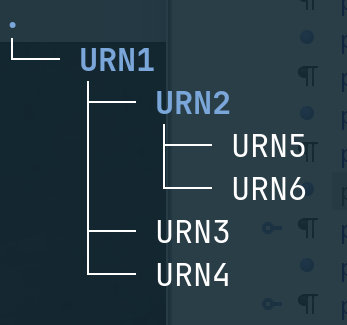
Importantly, the URNs allow us to reproduce a specific document configuration down
to the last version. Imagine an XML document that links to images and other XML
documents to form a tree structure, and where all links are in the form of
URNs:
What constitutes a change? What drives a version bump? For example, do we bump the
version if we fix a spelling mistake? Add a paragraph? Update a link? Remove or add
one?
It depends.
My 2014 Balisage paper on the subject [Multilevel Versioning], discusses this in
more detail, but essentially, there are a couple of things to consider regarding
change:
Not every change is meaningful. For example, if every save operation
creates a new version, very few of them will be useful.
Some identify small fixes. Others are used for adding new features. Yet
others are backwards-incompatible. Etc. These are different
levels of change; you can add as many as you like, as long as you define the
business rules.
Assuming well-defined version levels where each new version is
semantically meaningful, we also need an additional level that isn’t. In
that, we are only concerned with change meaningful to the author.
Some of the latter identify a workflow stage, i.e. this is a first complete
draft or this is now ready for review. They could mean
that the content is ready for a meaningful new version, perhaps one that is
one or more levels up, but they could also result in additional
changes on the same level. In other words, a workflow change is NOT the same as a
(meaningful) version change.
For a three-level set of versions X.Y.Z., we will therefore need a
fourth, only used for in-work changes.
Adding a translation happens to a specific version. A Finnish translation of the
English 1.0.0 document results in a Finnish 1.0.0. Etc.[3]
Remember that a translation is a rendition, not an exact copy. The original and
the translation are declared to be equivalent. They don’t need to, for example, have
the same node count; a single paragraph in one language may better express the
sentiment presented in two paragraphs in another. Images frequently need to be
localised, not only in terms of text but also cultural differences. Etc.
Version Markup Language
Version Markup Language (VML) is an approach and a Relax NG
Compact Schema for versioning (for more, see my Balisage 2014 paper [Multilevel Versioning] and the VML Github
repository [vml-github])
that resulted. A VML instance is an XML document describing the version history of
one
or more resources stored by a CMS. It is based on the URN principles as described
above
(see section “Identifying Resources Using URNs”), and it
is perhaps best described using an example:
<vml xmlns="http://www.sgmlguru.org/ns/vml">
    <resources>
        <resource>
            <base>urn:x-vml-exist:r1:doc:000001</base>

            <!-- Integer -->
            <version>
                <rev>0</rev>

                <!-- No physical document saved here -->
                <file>
                    <metadata><!-- Level 0 --></metadata>
                    <url></url>
                </file>

                <!-- Decimal -->
                <version>
                    <metadata><!-- Level 1 --></metadata>
                    <rev>0</rev>

                    <!-- No physical document saved here either -->
                    <file>
                        <url></url>
                    </file>

                    <!-- Centesimal - this is the first edit -->
                    <version status="c-o">
                        <metadata><!-- Level 2 --></metadata>
                        <rev>1</rev>

                        <file>
                            <metadata><!-- Level 2 (saved document v 0.0.1) --></metadata>
                            <url xml:lang="en-GB">/path/to/first/save</url>
                        </file>
                    </version>

                    <!-- Second edit -->
                    <version status="c-o">
                        <rev>2</rev>
                        <file>
                            <metadata><!-- Level 2 (saved document v 0.0.2) --></metadata>
                            <url xml:lang="en-GB">/path/to/second/save</url>
                        </file>
                    </version>
                </version>

                <version status="c-i">
                    <rev>1</rev>

                    <file>
                        <metadata><!-- Create version 0.1, first meaningful version --></metadata>
                        <url xml:lang="en-GB">/path/to/first/checked/in</url>
                    </file>

                    <!-- Check out to level 2 or check in to integer level -->
                </version>
            </version>
        </resource>
    </resources>
</vml>
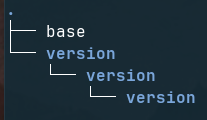
Let’s unravel this. A VML XML document is essentially a series of resources, each
of
which contains a nested version structure, like so:
Figure 2: Nested Version Elements
The base element provides the base URN, before versions (and their
renditions) are applied.[4] This means that the complete URN is what the base and the
nested version/rev elements provide. A version element looks
like this, regardless of level:
<rev>X</rev> provides a revision counter
on the current level. <url
xml:lang="YY-ZZ">/path/to/file</url>
links the actual file with the file’s URL and the localisation. A basic three-level
example XML file resource.xml resolving to a URN
urn:x-example:manual:000001:0.0.1 would look like this:[5]
The new version might then be reviewed and approved, bumping it to a minor
update (level 2), in which case the new version, 0.2.0,[6] would be registered like so:
The keen-eyed reader will note that version 0.0.2 and 0.1.0 both point at the same
file, /path/to/resource.xml.10, as no changes were required.
Storing Resource Versions
In the above example, the first stored version is
/path/to/resource.xml and the second
/path/to/resource.xml.10. What is actually stored here?
VML is a versioning abstraction, a way to identify meaningful change. It does not
dictate how or where to store the physical resources, only that the two are
different because they are identified using different version elements
in the CMS instance. A VML implementation might use a naming convention to keep the
saved resources unique in the file system,[7] but better is to implement it on top of a source control system such as
Git or, as in JACMS, eXist-db’s Versioning Module [github-versioning-module]. Many or even most of these systems save a diff rather than the entire file,
which has many advantages.
For a resource /db/test/doc/test.xml, eXist-db’s Versioning Module
records its version history like so:
A function v:doc() can be used to retrieve a specific version. For
example, v:doc($url, 17) will return version 17, above.
Resources in JACMS
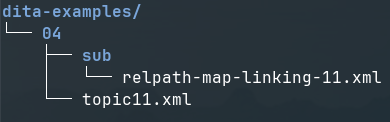
JACMS is built on top of eXist-db, a native XML database. We can use built-in
functions to produce a list of resources stored in a given collection and its
descendants in eXist. For example, given this collection hierarchy:
Figure 3: Files in eXist-db
We can output this as XML using built-in functions:
This is just an initial list of resources stored in eXist-db. These are not
necessarily managed by JACMS. When a new XML file is created, edited, and stored in
eXist-db, it needs to be added to the resources list, using a manual trigger; you
can
store and save XML in eXist-db without allowing it to be managed by JACMS.
The resources list can be displayed as a UI using XForms:[8]
Figure 4: Resources List XForm
The resources that are added to JACMS are enriched with an @id attribute,
a generated base URN that identifies the resource, to which separate
@version and @xml:lang attributes are added at the time of display:[9]
The initial list of resources is updated rather than regenerated whenever additional
resources are added to JACMS. Most XML resources are created in the CMS, but non-XML
resources such as images are created and edited elsewhere.
<namespace> is the URN namespace; allowed values are
defined in a config file
<type> is the type of resource (manual, illustration, 3D
graphic, etc); allowed values are defined in a config file
<sequence> is the first available sequence number of the
resource type
<version> is the version string, e.g. 0.0.1; the number of
levels is defined in a config file
<locale> is the combined language and country of the
resources; allowed values are listed in a config file
The URN generator is set of functions triggered when adding a resource to JACMS.
Depending on the type of resource, the exact process differs. Ideally, for example,
the XML should have an @xml:lang attribute that should be used to
populate the URN locale of the new XML. For a non-XML file, different approaches,
from file naming conventions to manually adding the information, are used.
Adding VML
The resources list (see section “Resources in JACMS”) is intended to list resources to be displayed. Usually
these will be the latest versions; the default view in JACMS is just that. The version
history of the resource is accessible in a separate VML instance, the two associated
with each other using the resource ID. Consider this resource:
The VML XML is first generated when the resource is added to JACMS. It is then added
to whenever a new version is created — which happens when checking in an edited XML
or
uploading a new non-XML resource. How the VML is updated depends on
the type of check-in. A new version is author-controlled if the purpose is to simply
check in your work. All that happens is the creation of a new version
structure on the same level.
A bump to a higher version level will generally require additional
workflow steps since its purpose is to produce a new, approved version. Note that
for a
three-level VML setup, the editing happens on level four; when a level four version
is
approved, it may result in a new version on any level, depending on the business rules
in place.[10]
In both cases, the check-in and the addition(s) to the VML are handled by XQuery and
some XSLT. Note that there is a third case, for the initial creation of the VML
instance. The processes are similar and rather simple — a check-in is essentially
a save
operation where we first generate a new version element with a
rev label (essentially a counter of preceding siblings and the new
element), and insert the new eXist-db version URL (see section “Storing Resource Versions”) to a
child url element.
Additional Metadata
A CMS is all about reuse. You may be familiar with the topic-based
paradigm, that is, writing small topics, each one about a single
subject, and then assembling the topics into full documents, with each document
reusing existing topics as needed. The topics are Lego blocks; the documents are
what you do with them. This is what XML vocabularies such as DITA and S1000D
advocate.
But, as everyone with experience from topic-based authoring will know, whilst most
topics can be reused if properly authored, there will always be content that needs
tweaking. For example, your topic describes an engine, but the engine variants are
all slightly different from each other, requiring differing assembly or disassembly
steps, different illustrations, part numbers, etc.
This is where profiling becomes essential.[11] Profiling is simply about marking content as applicable to only certain
configurations or properties. You have something like this:
<para product="A">This is for product A.</para>
<para product="B">This is for product B.</para>
<para>This is for all products.</para>
Variations of this basic theme are everywhere, albeit slightly different from one
vocabulary to the next.
There is plenty of other content-specific metadata to consider, from a topic’s
title to, say, vehicle VIN numbers or ATA codes.
Obviously, it would be useful to include some or all of the metadata in the listed
resources (see Figure 4, where we include profiling metadata on the
right-hand side). We probably don’t want to fetch that information from the content
at runtime, however, so they need to be attached to the resource item when
generating or updating the resources list, somehow. There are a few options:
Add the metadata as attributes (or elements, for that matter) to the
resources list. This is far from ideal, as it means that the metadata
applies to ALL resource versions, which probably won’t be the case.
Add the metadata to the VML document, either on the resource
element (meaning that the metadata applies to ALL versions) or on specific
version elements (meaning that the metadata only applies to
that version). The downside of this approach is that the VML schema would
have to accommodate any number of metadata approaches to handle the various
schemas we want JACMS to support.
Add the metadata to a third, separate XML file, with one file per resource
or even per specific version; or we could use a single file for all
resources. This is the cool approach; for more, see section “Coupling a Resource with Its Version History”.
Currently, JACMS uses option two. VML adds a metadata element to both
resource and version. metadata, in turn,
contains a foreign element that literally allows markup,[12] excepting elements in the VML namespace:
This, of course, requires additional validation and processing, and I’m not
convinced that it’s the best approach. It does work, though.
Coupling a Resource with Its Version History
Whilst it would be a reasonable approach to add the links to the VML directly in
the resources list, a more robust approach is to add a third XML document type, en
extended XLink linkbase,[13] to define those relations. Here’s a brief example:
<linkbase xmlns:xlink="http://www.w3.org/1999/xlink" xlink:type="extended">
    <title xlink:type="title">Connecting a resource with its linkbase</title>
    <group>
        <title xlink:type="title">A resource, its VML and the matchmaker</title>
        <locator xlink:type="locator" xlink:href="/path/to/resources-list.xml#id-123456" xlink:label="resources-list"/>
        <locator xlink:type="locator" xlink:href="/path/to/vml.xml#id-123456" xlink:label="vml"/>
        <arc xlink:type="arc" xlink:from="resources-list" xlink:to="vml"/>
        <arc xlink:type="arc" xlink:from="vml" xlink:to="resources-list"/>
    </group>
</linkbase>
This has several advantages. First, the relations are defined out-of-line,
independently from either document type, and can be kept unchanged if the resources
list is modified or even regenerated. Second, we can define the direction of the
relation — notice how there are two arc elements defining the
relationship between the resources list and the VML, one in each direction. And
third, the arc elements define relations between labels representing
the resources rather than the resource URLs themselves, allowing us to create
classes of relationships so we don’t have to define each one separately.
Finally, even though the current implementation places the metadata of each
resource and version inline in the VML instances, the linkbase allows us to move
that information to an out-of-line metadata XML document. It can also be argued that
a combined approach, with some metadata inline and some out-of-line, fits better
when adding XML vocabularies such as S1000D, where the so-called BREX data modules
that define the business rules of the setup are separate documents.
The Process
It occurs to me that the intended processes may not be obvious to the casual reader,
so this section attempts to fill in the gaps. Firstly, adding a new document to JACMS
control is a manually controlled process:
Create and edit an XML document in oXygen.[14] Save it in eXist-db.
Add the saved document to JACMS. This is currently a script that triggers
manually, generating a URN, additional resources list attributes, and a VML
instance. We also add the necessary linkbase locators and arcs.
Non-XML files are uploaded to eXist-db and then added to JACMS using that same
script. Currently, the script needs to be manually configured to add the
resource type (manual, image, etc) but the idea is to add this to the XForm
listing all available eXist-db resources.
Resources already controlled by JACMS get new versions as follows:
An XML document is checked out (there is a check-out/in flag, a
@status attribute, on the version element) and
edited. For non-XML resources, the editing happens outside JACMS. Once done, the
resource is uploaded and checked in.[15]
When the XML is checked in again, a function is triggered to generate a new
version element. By default, this essentially runs an XSLT that
adds the new version as a following sibling in the VML; this is
still a work in progress.
A checked-in XML may be bumped up to a higher-level version, from
a work in progress (e.g. 1.2.3.4) to the next approved version (e.g. 1.2.4).
This is a workflow process, not a simple check-in by the author.
In Closing
JACMS, as mentioned, is very much a work in progress, so if the paper sounds a bit
vague or even contradictory in places, it probably is. The final version of this paper
will hopefully not have those particular problems.
Here are the next few steps (some of which may be done by the time you read
this):
Finish the functions and transforms that manipulate version progression. This
is on-going as I write this, but getting along nicely.
Add functions that register a physical file to a new version.
Add workflow functionality to the VML.
Finish the various XForms required to display resources and their versions;
what I have at the time of this writing are tests and drafts.
Check-out/Check-in functionality
Etc.
But also, make the JACMS repository public.
Lastly, I’d like to thank my friends Charaf Eddine, Joe Crowther, Adam Retter, and
Geert Bormans, all of whom have contributed ideas, support, and encouragement.
[1] The original could be any one of them, or some other
rendition of version 3.
[2] Think of an image saved in PNG and JPG formats. The methods or renditions
differ but the content remains the same.
[3] An argument can be made that the Finnish translation could have a number
of separate, independent fourth-level versions meaningful to the
translation, but in my view, this is not consistent with a single version
and localisation strategy.
[4] Importantly, a base URN is what I call an abstract
resource, something that does not concern itself with a specific
version (how the resource changes over time) or rendition (locale). The base URN
cannot be an actual physical resource, but it’s a useful abstraction to provide
a unique identifier for a resource.
The very first version of a new resource will always have a version (for a
four-level version this will be 0.0.0.1) and a locale. The base
URN is an abstract thing; it intends to cover everything but is unable to point
to a specific version or rendition.
[5] Assuming a single version component in the URN.
[7] Or store them in different folders, or any combination thereof, an
approach suggested in my original Balisage paper.
[8] The UI presented here is a test and will change.
[9] The list is used in multiple contexts, some of which require to list older
versions and other locales.
[10] Here, a business rule is simply the practice that dictates what level the new
version will get depending on the content change, as employed by the
organisation.
[11] It is important to note that profiles must be part of
the content, as stored in the CMS, just as a title or paragraph would be.
JACMS is not about storing any possible profile, just the
ones that are actually expressed by the markup.
If you come from a DITA world, the available profiles are part of the
content handled by the CMS. The possible outputs, as defined by DITAVAL
filters, may not be, unless the DITAVAL filters, themselves XML documents,
are handled by the CMS. DITAVAL documents are usually applied when
publishing a DITA map and therefore frequently seen as transient. How they
are managed is not something I should decide; if a JACMS user wants to store
specific DITAVAL filters, it should work. If not, it should work,
too.
[12] This could be my first-ever ANY content model. Certainly one
of very, very few.
[14] oXygen has an out-of-the-box integration with eXist-db.
[15] There needs to be a UI control in the XForm to trigger the upload from
the right resource in JACMS, but no such thing exists at the time of
this writing.