Introduction
This paper describes the implementation of an interactive XQuery [1] environment that enables staff users to query an archive that contains more than 5.6 million scholarly journal articles in a variety of XML formats. This system, built using BaseX [2], enables its users to quickly and easily interrogate the metadata and documents in a content repository to support a wide range of requests and workflow needs. User access is facilitated through two complementary user interfaces that cater to different user activities: a web-based interface and a Jupyter Notebook [3] interface. Users can interact with the archive by entering queries using the XQuery query language, which is enhanced by the system for users’ convenience and security. The implementation followed an iterative process, beginning as a side project, and adapting as problems and new requirements arose. Insights learned from this project may be transferable to similar projects.
This paper begins with a description of the content repository and the context in which this project was developed. Next, the two user interfaces are described, including features that are common to both interfaces and the different scenarios that are supported by each interface. This is followed by a description of the XQuery enhancements that the system provides. The system’s architecture is then described, presenting practical design patterns and architectural decisions, including the storage layout, synchronization with the content repository, and job delegation pattern. Next, the paper describes the project’s evolution, and emphasis is placed on design choices that improved usability, performance, and maintainability, with insights that may benefit others implementing similar XML database solutions.
The DARTS Archive
The system described in this paper was built to provide access to an archive, so an understanding of the content repository that holds the archive must first be established.
The content repository, known as DARTS, which stands for Distribution, Article Repository and Tracking System, is a mission-critical application within Taylor & Francis, a publisher of scholarly journals. DARTS holds an archive of more than 5.6 million journal articles, in PDF and XML formats, for more than 2,500 journals. The archive grows rapidly, with more than 201,000 articles added during the most recent calendar year.
DARTS has a key role in production operations at Taylor & Francis. DARTS receives content (journal articles and issues) from production systems, securely archives the content, sends the content to Taylor & Francis’ primary online platform, T&F Online (https://www.tandfonline.com), and distributes the content to a wide range of partners including Web of Science, Scopus, OCLC, and PubMed Central. The archive is maintained by a small team of Digital Production staff, and DARTS is supported by internal developers.
The DARTS archive contains XML in different formats (DTDs) that have been used in Taylor & Francis’ production department over a time span of more than 22 years. The formats include: JATS versions 1.4 and 1.2; TFJATS, a customized version of JATS 1.0; and TFJA, a proprietary journal article DTD that was created in the early 2000s.
The user interface for DARTS provides tracking of content in the archive and the ability to deliver content using a range of transformation options. Digital Production team members are its primary users. DARTS is optimized for serving its core purpose, so it does not offer functionality for viewing content or performing general searches, as those capabilities are provided by other systems such as T&F Online.
Motivation
The project described in this paper began as a personal side project in late January 2026. The author needed a better way to access the article XML in the DARTS archive while working on various activities:
-
Transform files from legacy formats to current JATS.
-
Find content affected by Schematron validation rules.
-
Find instances of specific types of content or specific XML tagging.
-
Quickly examine the XML for one article or collections of articles.
-
Create reports for colleagues from the article XML in our archive.
-
Examples: alt text, data availability statements, correction statements.
Ideally, it would be possible to easily run XQuery on the archive for:
-
One article
-
Collections of articles
-
The entire corpus
If such capabilities were available, it would benefit the author’s own work and would also help colleagues who could benefit from having an easy way to query the article XML in the DARTS archive.
Building on previous foundations
Previously, a database that was built using eXist-db (an open-source XQuery database) provided capability for running XQuery on the DARTS archive. Experience with this database proved the usefulness of being able to run queries on article XML documents contained within the archive. The implementation using eXist-db had also proved the ability to connect to the DARTS archive using XQuery, SQL, and HTTP. However, only two staff members were able to use this database effectively due to the system’s capacity, which struggled under concurrent access, and the required skill level for using the database. After a catastrophic system outage revealed that the backup and recovery process did not work well, it became apparent that a different solution was needed and the archive may be larger than the capacity of eXist-db.
In seeking a new solution, three options were considered: BaseX, Elemental, and Rumble DB. All three of these XQuery databases are freely available as open source or fair source software. The decision to use BaseX was guided by technical and practical concerns.
The author has used BaseX in other successful projects, which made BaseX a natural choice to be able to build and launch quickly. This was an important factor considering that this activity was a side project intended to enable other work. The fact that BaseX was already being used and working well in other areas also had created awareness of BaseX among colleagues who might be cautious of unfamiliar software. Another important factor was that BaseX has modules for SQL and HTTP, which are essential for connecting to the DARTS Archive, and supports RESTXQ [4] and the latest XQuery 4.0 features. Initially, the possibility of reusing code from eXist-db could speed the creation of a new implementation using BaseX (although as the project evolved new code replaced most of the original code). BaseX would also be able to run on the existing server that had hosted the eXist-db database. As further assurance, BaseX has been shown to be effective for creating custom web-based user interfaces that support the work of teams in publishing organizations [5].
The new solution, built using BaseX, achieved the goals that had motivated this project in a relatively short time. Through an iterative development process, adapting through experience, the new database quickly became useful. After only about 5 months of development as a side project, it was possible to share the new solution with colleagues.
Name: Banyan Grove
As development of the project progressed, it became necessary to create a name that could be used in a user-friendly network address and in user interface components. The tree structure of XML provided an initial framing to consider actual trees for inspiration, and further inspiration was derived from the fact that the archive holds many journal articles and is intended be protected and stable for a very long time.
The author found that Banyan trees provide a wonderful metaphor for this project. Banyan trees can grow to massive size, they can live for centuries, they have many surprising medicinal uses, and they are often considered sacred and protected. These qualities of Banyan trees also describe the archive, albeit in a different context. This inspiration led to the project’s name, “Banyan Grove.”
Solution Overview
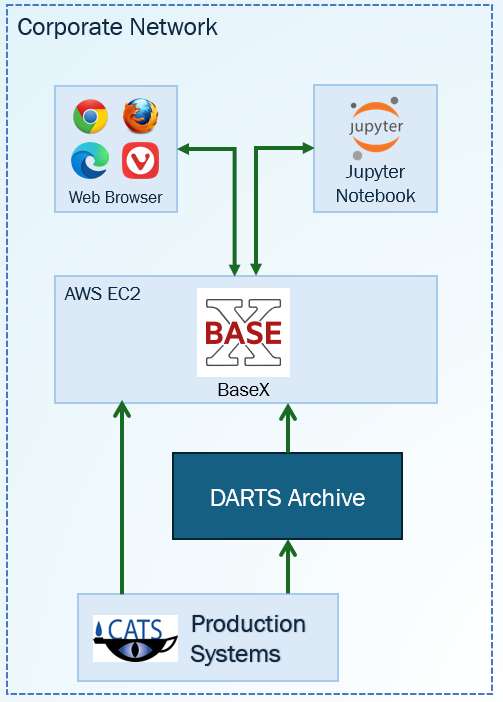
The diagram in Figure 1 provides a high-level view of the Banyan Grove system.
The DARTS Archive sits within a corporate network that can only be accessed by staff. Banyan Grove, likewise, sits within the same corporate network and is hosted on an EC2 server in AWS.
Banyan Grove has a loading process, implemented in XQuery, that runs daily to import content from the DARTS Archive into BaseX, including article XML and issue XML documents, and metadata about each document. The documents are obtained using HTTP, and the metadata is obtained using SQL, in the manner that DARTS requires. This same loading process was used to initially populate BaseX by importing the entire archive, which took about six days to complete. When importing new content each day, the loading process typically takes a few minutes to complete.
The loading process also imports frequently used data from our production systems into BaseX using SQL and HTTP.
There are two user interfaces, a web browser interface and a Jupyter notebook interface. The web browser interface is more user friendly, and the Jupyter Notebook interface is better suited for iterative processes, although both interfaces offer the same capabilities and connect to the BaseX server using the same RESTXQ API. The two user interfaces will be described in more detail in the next section.
Figure 1: Solution Overview
User access: Two complementary options
Recognizing that different tasks require different tools, Banyan Grove offers two complementary user interfaces, each optimized for different needs. The same functionality is provided in both interfaces, allowing users freedom to choose which interface to use for any task they are doing.
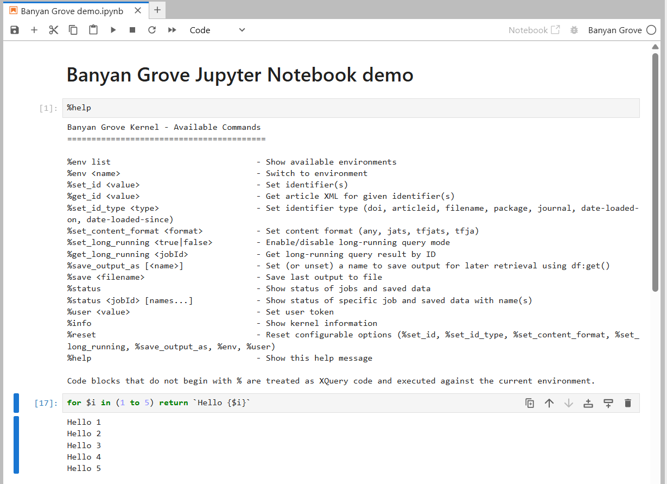
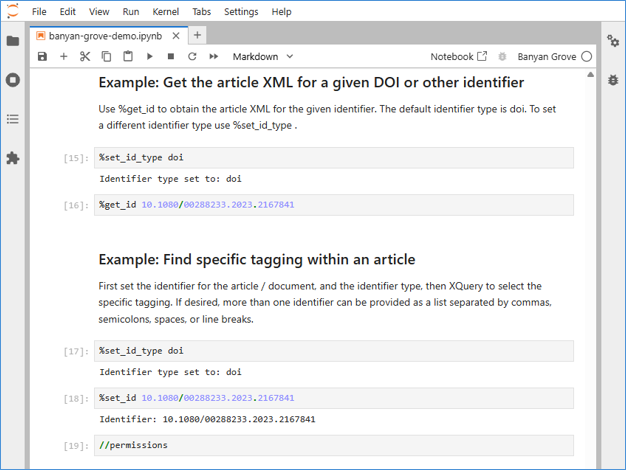
Figure 2, a screenshot of the web interface, and Figure 3, a screenshot of the Jupyter Notebook interface, illustrate the similarity of the two user interfaces. Both interfaces have on-screen help and allow users to select content in the archive, enter XQuery expressions, and see the output of their query.
The next sections will describe each interface in more detail.
Figure 2: Web interface showing on-screen help, a XQuery expression, and results of the query
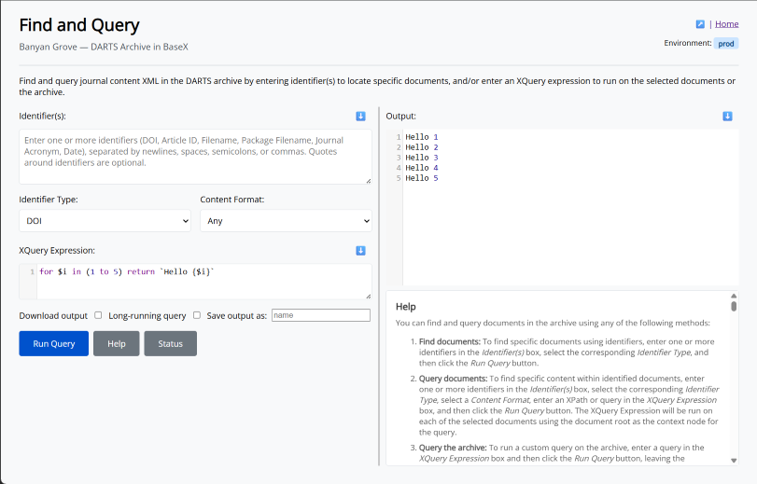
Figure 3: Jupyter Notebook interface showing on-screen help, a XQuery expression, and results of the query
Web-based interface
The web interface has several screens including “Find and Query,” which provides the main functionality for running queries, as well as screens for logging in, a home screen with a menu of options, pre-packaged reports, a quick document retrieval function, and server status.
The web interface for Banyan Grove was inspired by the DBA application that ships with BaseX. The DBA application is open source, and source code of the DBA application provided examples of how RESTXQ can be used to serve a web-based interface that allows users to interact with data on a BaseX server. In particular, the “Editor” screen in DBA allows users to enter XQuery expressions to be run on the server and displays the output, like the functionality that would be available in the “Find and Query” screen in Banyan Grove.
The “Find and Query” screen provides three different ways to query the archive, which are based on what the user enters in the input fields “Identifier(s)” and “XQuery Expression.”
-
Find documents - To simply find documents, users can enter one or more identifiers in the identifiers box and select the identifier type. After pressing the Run Query button, the selected documents will be displayed. This works with different identifiers such as DOI, article ID, or file name.
-
Query documents - The second option allows using XQuery to extract specific content from selected documents. Users can enter identifiers and select the identifier type in the same way as just described, but with additional options for identifier type: package file name, journal, or date. The query expression will be run on each of the selected documents. The output includes metadata to identify the source document for each result.
-
General Query - The third option allows users to run a general query by entering a query in the XQuery Expression box and leaving the identifier’s box empty.
The system is very quick to provide results for most queries. However, queries that are run on a large set of content or run across the entire archive can take a long time to finish. This might be 30 minutes or more, depending on the amount of content selected and the complexity of the query.
The “Long-running query” option is provided for this scenario. When the “long-running query” box is checked, the query is run as an asynchronous job on the server, and a unique job ID is provided to the user. The user can click the Status button to view the status of the query and obtain the results after the query finishes.
There is an option to save query output with a name entered by the user. This option is also helpful for iterative processes where the output of one query is used as input for another query. The Status button displays a list of data that the user has saved on the server.
The Find and Query screen also has many features for users’ convenience:
-
Identifiers can be entered with a variety of common delimiters, allowing for easy copy/paste from emails or spreadsheets.
-
There is syntax highlighting for XQuery expressions and for the output, thanks to the CodeMirror javascript library.
-
There are several ways to download the information that is displayed on screen.
-
The input and output boxes can be resized by the user.
-
On-screen documentation is available via the “Help” button.
-
The “Status” button displays the status of queries that are running on the server, recent log messages, and provides access to saved data.
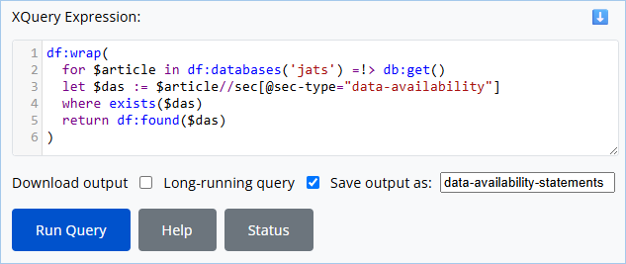
To give an example of how the Find and Query screen can be used to query the archive, the query shown in this screenshot finds Data Availability statements within any article in JATS format. As this query searches within all JATS format XML in the archive, the query is entered as an XQuery Expression, with the Identifier(s) field left blank.
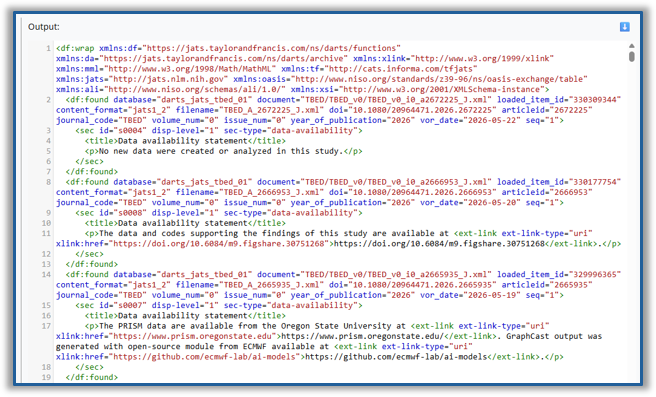
In this query, the “wrap” function creates a root element that declares a standard set of namespaces, the query scans all JATS XML in the archive and uses a sec-type attribute to extract data availability statements from articles, and the “found” function provides metadata that identifies the source document for each of the statements.
The query is set to run in background as a long-running query, and the output saved with the name “data-availability-statements.”
Figure 4: Screenshot showing a query for Data Availability statements
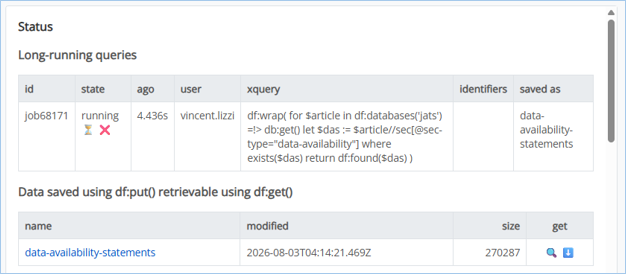
The “Status” button is used to check the status of the query, and obtain the saved results.
Figure 5: Screenshot showing the status of a running query and saved data
This next screenshot shows part of the output from this query.
Figure 6: Screenshot showing a part of the result of a query for Data Availability statements
One last thing to mention about the web interface is that it has a menu of pre-packaged reports that users can easily run to obtain data that is frequently requested:
-
The “All Articles” report provides a list of all articles in specified journals with metadata extracted from the article XML.
-
The “Alt text stats” report provides statistics about accessibility alt text and long descriptions on images and tables in article content.
Jupyter Notebook interface
The Jupyter Notebook interface provides the same interactive XQuery functionality as the Find and Query screen on the web interface, but in a Jupyter Notebook environment, making it possible for users to choose which interface to use for any task. Jupyter Notebooks can contain notes in Markdown format, code, and the output of code in a single document. The ability to save work in a notebook is helpful in a variety of scenarios such as iteratively working towards a goal, data analysis, repeatable processes, and documenting your work.
One slight drawback of the Jupyter Notebook interface is that it requires installation on the user’s local computer. The Jupyter kernel [6] is a piece of software that runs the code in a Jupyter notebook and connects to the BaseX REST XQ API. The on-screen help in the web interface provides instructions on how to install and configure the Jupyter Notebook environment, and two example Jupyter Notebook files that contain extensive documentation and examples.
Code in a Jupyter Notebook can be commands just like in the web interface, such as %help, %status, %set_id, %set_id_type, %set_long_running; or XQuery Expressions, which are run on the Base X server. Using the Jupyter Notebook environment may feel more manual than the web interface because commands must be typed, but its great advantage is the ability to have all your notes, queries, and output saved in one document.
The Jupyter Notebook interface can only be accessed within the corporate network and requires authentication using a uniquely generated user key.
Figure 7: Screenshot of the Jupyter Notebook interface showing two example queries
XQuery enhancements for Productivity and Security
Banyan Grove has features that automatically enhance user-provided XQuery expressions for increased productivity and security.
Productivity features and function library
In the examples shown in the previous section, the XQuery Expressions take advantage of the function library and XQuery enhancements that Banyan Gove provides.
Without enhancements, writing XQuery to query this archive would involve writing, or maybe copy/pasting, namespace declarations, module imports, and perhaps some functions to select content and include desired metadata in the output. After a while, entering such mechanics might become routine. Banyan Grove provides these mechanics automatically, so that users can focus on writing XQuery expressions for what they need. A preamble with namespace declarations and module imports is automatically added to XQuery Expressions.
Queries are run with enhancements automatically applied depending on what the user entered for Identifier Type, Content Format, Identifier(s) and/or XQuery Expression, and the number of documents selected. The query is enhanced by adding a standard set of module imports and namespace declarations. The query processor can enhance the output by adding a root element with namespace declarations and may also add metadata to identify each source document. These output enhancements are added automatically by the query processor based on the identifier type and the number of results.
If the user enters a XQuery Expression without entering any identifiers, the query is run and the output is delivered unmodified. This is useful for queries that produce non-XML outputs such as JSON, CSV, or plain text.
In addition, a function library provides shortcuts for many common tasks. The on-screen documentation describes the functions that are available in the function library, and includes tips and code snippets, to help users with writing XQuery Expressions.
Adding guardrails to user-provided XQuery
Security conscious readers may already be concerned by the idea of allowing any XQuery submitted by users to run on the server. It is true that accepting random XQuery code to run on a server could present enormous risks. A nefarious actor could destroy the database or perhaps use the server to stage even more consequential attacks.
Guardrails are needed to constrain what user-provided XQuery expressions are allowed to do, allowing users freedom within safe boundaries.
All queries are submitted through one RESTXQ API endpoint, where a series of checks are applied before XQuery code is allowed to run. This applies to queries entered via the web interface and the Jupyter Notebook interface.
First, the API request is authenticated using unique, system-generated user identifiers.
All queries are recorded in the server logs.
XQuery provided by a user is parsed using the function xquery:parse(), which may identify syntax errors and other problems. The parse tree is examined to determine if the XQuery is an updating query, meaning that it would attempt to make changes on the server, or if it contains any functions that are disallowed. String matching is also used to check the XQuery for unsafe actions. A XQuery expression is blocked if it attempts to do any unsafe actions that would: update or delete anything on the server, access files on the server, or run arbitrary code. If any problems or violations are found, helpful error messages are displayed to the user, and the query is prevented from running. The details of how this works can be found in the code listing of find-query.xq, lines 58-88, in the Appendix.
Architecture, Project Evolution & Lessons Learned
This section provides details about the architecture of the system, how the project evolved, and some learnings that might be transferrable to other projects.
Many lightweight databases
At the outset of this project, one or the first decisions that needed to be made was how to store the documents and metadata in BaseX. Within BaseX, documents are stored in databases, and it is possible to organize documents by creating as many databases as are needed. How documents are organized into databases affects usability and performance of the system. Early usability testing helped to improve the design of the storage layout.
In Banyan Grove, documents are organized in many small databases, each for specific purposes. This approach was selected to support expected usage patterns and make it easier to perform maintenance activities such as backup and recovery.
There is one index database that holds metadata for every document in the archive. This database supports fast searches using identifiers. The metadata will be described in more detail in the next section.
There are two databases used by the import process for maintaining synchronization between BaseX and the DARTS repository. One database stores tracking data each time the import process is run, and the second database records the details of any errors.
The actual content XML is stored in databases that are organized based on content format and journal. One of the use cases is to query within a specific journal, so having separate databases for each journal supports this usage pattern. Each of the XML formats in the archive (JATS, TFJATS, and TFJA) require different XQuery Expressions, so having separate databases for each XML format would make it easier to run queries. These databases are named using a naming convention that contains identifiers for the XML format and journal. The naming convention also includes a number suffix for future expansion. This naming convention is described in Table 1. The function library provides two functions that can be used to obtain the names of databases for a specific XML format and journal: df:databases($format), and df:databases($format, $journal).
At the time of writing, quantifiable statistics for the database storage are:
-
10,481 databases
-
5,954,512 documents
-
359 GB total size on disk
-
34 Mb average database size
Table I
Databases and naming convention
| Database | Contains |
|---|---|
| darts_01_index | Metadata XML for every Content XML document |
| darts_02_log | Import process tracking data |
| darts_03_error | Import process error records |
| darts_{format}_{journal}_{nn} | Content XML and Metadata XML for a specific format and journal, with numbering to allow growth |
Dual metadata storage
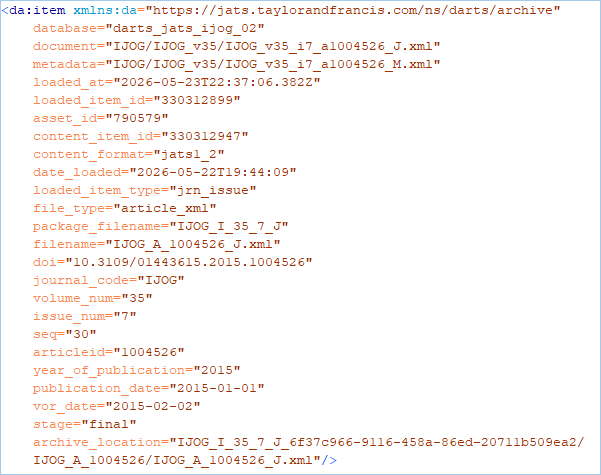
As mentioned in the previous section, every article XML and issue XML document has a metadata sidecar document that contains metadata from the DARTS repository. The metadata includes identifiers for the content, identifiers for locating the content in DARTS, the location of the content in BaseX, the original file names, and other useful metadata.
Initially, the metadata was designed to include only a minimal set of information that was thought to be needed. After gaining experience querying the database, it was found that additional metadata would be useful. This refinement led to re-importing from the DARTS archive into BaseX after making changes to the loading process to include the additional metadata.
The metadata format is very lightweight. There is only one element per document. All data is stored in attributes, which BaseX can process very efficiently. Figure 8 shows an example of the metadata.
Each metadata sidecar document is stored twice to support different use cases:
-
One copy is saved in the index database. This copy supports fast document retrieval using identifiers. For example, when a user queries for an article using an identifier such as a DOI, the copy in the index database is used to locate the document.
-
The other copy is stored in a content database paired with its document. This copy supports fast metadata retrieval from the perspective of the document. For example, when a query locates an XML fragment within a document, the metadata that is stored alongside the document can be used to obtain the identifiers for the document.
Figure 8: Example of a metadata sidecar for an article XML document
Content repository synchronization
An automated loading process handles importing content and metadata from the DARTS repository into BaseX. The loading process is implemented in XQuery and connects to the repository via the methods that are required by DARTS: SQL is used to obtain metadata, and HTTP is used to obtain files. This is a multi-step process:
-
The loading process is initiated on a schedule using BaseX’s job module or can be initiated manually if needed.
-
The yield module, which uses BaseX’s job module, checks if the loading process or any other processes that might conflict with the loading process are currently running. This check can prevent a loading process from starting so that conflicts between concurrent updates can be avoided.
-
Tracking data for the loading process, which is stored in a BaseX database, is checked to find the minimum and maximum bounds of the content that is stored in BaseX, expressed as a date range. This is compared with the DARTS repository to identify what content may need to be imported into BaseX. This provides an identifier for a batch of content, expressed as a date when files were stored in the DARTS archive.
-
The DARTS repository is queried, using SQL, to obtain metadata for the documents associated with the batch identifier.
-
This metadata is used to create BaseX databases using the naming convention that was described earlier.
-
This metadata is then normalized to correct variations that are present in the repository, create file paths for where the document and metadata sidecar will be stored in BaseX, and reformatted into the metadata sidecar format described in the previous section.
-
Each document is retrieved from DARTS, using HTTP, and stored in a content database in BaseX along with its metadata sidecar.
-
The metadata sidecar documents are written to the index database in BaseX.
-
Tracking metadata about the loading process is stored in a BaseX database.
-
The loading process triggers itself to run again, looping back to step 2, if there is more content that needs to be loaded.
-
If there is no more content to be loaded, as identified in step 3, the BaseX function db:optimize() is run on all databases for which BaseX’s internal indexes need to be updated.
This loading process has proven to be reliable. The implementation of this process had several challenges, which will be described in the next sections.
Job delegation pattern
The loading process, as described in the previous section, is a XQuery program that dynamically creates databases and then populates the databases. In BaseX, due to constraints of the XQuery Update Facility, it is not possible to have a XQuery process that dynamically creates databases and subsequently writes to or reads from those same databases, because the databases are not physically created until the XQuery execution is finished. This constraint was solved using a job delegation pattern in the design of the loading process, which is implemented using BaseX’s job:execute() function.
BaseX provides an extension function job:execute() that allows a query to run another query in a separate process and wait until that query finishes. Using the job delegation pattern, a main XQuery process handles control flow and passes data around. All tasks that involve reading or writing data are delegated as tiny, specific actions using the job:execute() function.
All tasks that use the XQuery Update Facility to create or write to BaseX databases (actions that use functions such as db:create() to create a database and db:put() to store a document) have to be delegated using job:execute(). In addition, all actions that read data, including data from external sources such as SQL and HTTP request, must be delegated using job:execute() to avoid deadlocks. Before learning the full scope of actions that must be delegated, the loading process would stall in a deadlock state.
The job delegation pattern can be applied in any BaseX query that needs to perform a similar combination of actions that would otherwise not be possible to do in a single query.
Optimizing write performance
Another surprise led to a dramatic optimization in the import process.
At first, the import process used one XQuery Update expression to retrieve a document from the DARTS archive and store the document and its two copies of metadata. These 3 items should all be saved together or not at all. This design of the process ensured that there would be no orphaned document or metadata if an error occurred while retrieving a document from the DARTS Archive.
Observation using the Windows Process Monitor while the import process was running revealed that the index database had much more activity than any other and appeared to be creating a bottleneck.
The import process was redesigned so that metadata would be written to the index database in bulk as a separate delegated XQuery Update expression, with careful tracking of errors to ensure that no documents or metadata are orphaned.
After this change, the processing time required to import the entire archive from DARTS to BaseX reduced from about 4 weeks to 6 days.
Measuring Success
Success of this project can be measured by real usage of the system. The Banyan Grove database is doing exactly what had been intended at the beginning of the project. It is proving to be easy to use and reliable, and has already been used in various ways, such as:
-
The database has helped the author to quickly answer questions about the XML tagging in the archive and in specific articles.
-
The database has been used to create reports that combine specific content extracted from article XML with data from a separate production tracking system.
-
The database has proven useful for querying the XML in the archive while creating transformations and while investigating Schematron validation errors.
-
The database has been used by team members to assist with locating problems that need to be corrected in the archive.
-
The database has also been used by team members to fulfill requests for data.
-
In general, this database is helping us to do more in less time.
An additional benefit, not anticipated at the beginning of the project, is that the same API that was created to support the web interface and Jupyter notebook interface is now also being used by other systems to query the content in the archive.
In comparing the two user interfaces, the Jupyter notebook interface tends to be selected when working in more intentional ways, such as when planning to run several queries to accomplish a goal. The web interface is selected more often because it is readily available in a web browser.
Conclusion
This article has described the design and implementation of an interactive XQuery environment built using BaseX to support a production team responsible for maintaining a large archive of scholarly journal articles. Development focused on two key priorities: equipping users with options and productivity features to support a wide range of use cases, and ensuring that the system remains secure and reliable. Design decisions were shaped by the structure of the archive itself, by anticipated usage patterns, and by observations gathered during early development.
Several challenges arose over the course of the project, and the solutions developed to address them may prove useful to similar efforts elsewhere. In addition, this work demonstrates that BaseX can effectively query a large-scale archive, in this case 5.9 million documents, and that design choices have a measurable impact on system performance. Actual use of the system has confirmed that this project has succeeded in meeting its goals.
Acknowledgements
The author would like to thank the Balisage conference, the people who have made this conference possible, and Balisage attendees. The Balisage conference, in many intangible ways, helped to make the project described in this paper possible. Balisage has provided a wonderful space for learning, incubating ideas, and sharing of information among a diverse and supportive community of practitioners.
The author would also like to thank the BaseX team and the QT4 working group for providing much of the software and standards that were used in this project.
Supplementary Material
The PowerPoint slides that accompany this paper contains the slide deck that was presented at Balisage and includes a bonus slide deck “XPath & XQuery Primer: Essentials to help you get started.”
Appendix A. Appendix
This appendix shows the code that processes queries submitted by users via the web-based and Jupyter Notebook interfaces.
app.xqm
The module app.xqm contains functions with RESTXQ annotations that serve the web application. The excerpt shown here supports the most of the functionality of the web-based user interface as well as providing API endpoints that are used by the Jupyter Notebook interface.
(:~ Display find-query page. :)
declare
  %rest:path("/banyan/find-query")
  %rest:produces("text/html")
  %output:method("text")
  %output:media-type("text/html")
function app:find-query-html () {
  common:no-cache-header(),
  unparsed-text('find-query.html')
  => common:renderTemplate(common:templateData({
    'inline-script': common:no-cache-script(),
    'help_content': unparsed-text('find-query-help.html')
  }))
};

(:~ Run find-query and return results. :)
declare
  %rest:path("/banyan/find-query.xq")
  %rest:POST
  %rest:form-param("identifiers", "{$identifiers}")
  %rest:form-param("identifierType", "{$identifierType}")
  %rest:form-param("contentFormat", "{$contentFormat}")
  %rest:form-param("xquery", "{$xquery}")
  %rest:form-param("longRunning", "{$longRunning}")
  %rest:form-param("saveOutputAsName", "{$saveOutputAsName}")
  %output:indent('yes')
function app:find-query-xq (
  $identifiers as xs:string,
  $identifierType as xs:string,
  $xquery as xs:string,
  $contentFormat as xs:string,
  $longRunning as xs:string?,
  $saveOutputAsName as xs:string?
) {
  let $user := common:auth-key()
  return if (not(common:known-user($user))) then
    'User is not recognized.'
  else (
    common:restore-session-user-key($user),
    let $bindings := {
      "identifiers": $identifiers,
      "identifierType": $identifierType,
      "xquery": $xquery,
      "contentFormat": $contentFormat,
      "saveOutputAsName": $saveOutputAsName,
      "longRunning": $longRunning,
      "user": $user
    }
    let $query := xs:anyURI('find-query.xq')
    return try {
      if ($longRunning) then job:eval($query, $bindings, {'cache': true()})
      else (
        let $jobId := job:eval($query, $bindings, {'cache': true()})
        return (
          job:wait($jobId),
          job:result($jobId, {'keep': true()})
        )
      )
    } catch * {
      $err:description
    }
  )
};

declare
  %rest:path("/banyan/find-query-api/status")
  %output:method("json")
  %output:indent("yes")
function app:find-query-status () {
  app:find-query-status((), ())
};

declare
  %rest:path("/banyan/find-query-api/status/{$jobId=job\d+}")
  %rest:query-param("saved", "{$saved}")
  %output:method("json")
  %output:indent("yes")
function app:find-query-status (
  $jobId as xs:string?,
  $saved as xs:string*
) {
  common:restore-session-user-key(common:auth-key()),
  {
    "jobs": array:build(
      for $job in
        if (exists($jobId)) then job:list-details()[@id = $jobId]
        else job:list-details()[ends-with(., 'find-query.xq')]
        => reverse()
      let $bindings := job:bindings($job/@id)
      return map:merge((
        {
          "id": string($job/@id),
          "state": string($job/@state),
          "time": string($job/@time),
          "ago": string(df:system-dateTime() - xs:dateTime($job/@time))
        },
        { "user": replace($bindings?user, '@.+', '')},
        $bindings
      ))
    ),
    "saved": array:build(
      for $file in
        if (exists($saved)) then df:get-list()[@name = $saved]
        else df:get-list()
      order by $file/@name
      return {
        "name": string($file/@name),
        "modified": string($file/@modified-date),
        "size": string($file/@size)
      }
    ),
    "logs": array:build(
      current-date()
      => format-date('[Y0000]-[M00]-[D00]')
      => admin:logs()
      => filter(fn($e){
        (exists($jobId) and starts-with($e, $jobId))
        or matches($e, '^job\d+')
      })
      => slice(start := -15)
      => reverse()
      => for-each(fn($e){{'time': string($e/@time), 'message': string($e)}})
    )
  }
};

declare
  %rest:path("/banyan/find-query-api/cancel")
  %rest:POST
  %rest:form-param("jobId", "{$jobId}")
function app:find-query-cancel (
  $jobId as xs:string
) as xs:string? {
  let $user := common:auth-key()
  let $jobUser as xs:string? := job:bindings($jobId)?user
  return if ($user = $jobUser) then (
    $jobId || ' cancelled',
    admin:write-log($jobId || ' cancelled, state: ' || job:list-details($jobId)/@state),
    job:remove($jobId)
  )
};
find-query.xq
This is the main query that processes queries submitted by users.
Lines 58 – 88 apply guardrails to user-provided XQuery.
import module namespace df = "https://jats.taylorandfrancis.com/ns/darts/functions" at "../util/functions.xqm";
import module namespace yield = "https://jats.taylorandfrancis.com/ns/darts/loader/yield" at "../loader/yield.xqm";

declare namespace da = "https://jats.taylorandfrancis.com/ns/darts/archive";

(:~ User-provided identifiers :)
declare variable $identifiers as xs:string? external := '';

(:~ User-provided identifier type :)
declare variable $identifierType as enum(
  'doi', 'articleid', 'filename', 'package', 'journal', 'date-loaded-on', 'date-loaded-since'
) external := 'articleid';

(:~ User-provided Content Format :)
declare variable $contentFormat as enum('any', 'jats', 'tfjats', 'tfja') external := 'any';

(:~ User-provided XQuery Expression :)
declare variable $xquery as xs:string? external := '';

(:~ User-provided name to save the output using df:put :)
declare variable $saveOutputAsName as xs:string? external := '';

(:~ Parse user-provided identifiers string into a sequence :)
declare variable $ids as xs:string* := df:tokenize($identifiers);

(:~ Add preamble with function library and common namespaces to user-provided XQuery Expression :)
declare variable $query := df:xquery-preamble-declarations() || $xquery;

(:~ Flag for presence of a user-provided XQuery Expression :)
declare variable $runQuery as xs:boolean := string-length(normalize-space($xquery)) gt 0;

(:~ Constant for the name of the index database :)
declare variable $db-index := df:config('db-index');

(:~ Capture the timestamp when this query started :)
declare variable $startedAt := df:system-dateTime();

(:~
 : Echo the data, and if a name is provided then save the data using df:put
 :)
declare function echo-save (
  $data as item()*
) as item()* {
  $data,
  if (string-length($saveOutputAsName) gt 0) then (
    df:put($data, $saveOutputAsName)
  )
};

(:~
 : Begin by logging the user's input with the jobId.
 : Every run will typically create 4 log entries that begin with the jobId and " find-query ".
 :)
admin:write-log(job:current() || ' find-query user: ' || df:user() || '; save: ' || $saveOutputAsName),
admin:write-log(job:current() || ' find-query format: ' || $contentFormat || '; ' || $identifierType || ': ' || string-join($ids, '; ')),
admin:write-log(job:current() || ' find-query query: ' || $xquery),

(:~
 : Apply guardrails to user-provided XQuery Expression.
 : The query is first parsed, which may identify problems such as syntax errors.
 : A query is blocked if it attempts any unsafe actions that would:
 : update or delete anything on the server, access files on the server, or run arbitrary code.
 :)
try {
  if ($runQuery) then
  let $parsed := xquery:parse($query)
  let $unsafe := (
    'xquery:eval', 'xquery:eval-update', 'job:eval', 'job:execute', 'job:bindings',
    'proc:system', 'proc:execute', 'proc:fork',
    'user:create', 'user:grant', 'user:drop', 'user:alter', 'user:password', 'user:update-info',
    'admin:logs', 'admin:delete-logs',
    'repo:install', 'repo:delete',
    'xslt:transform', 'xslt:transform-text', 'xslt:transform-report',
    'file:list', 'file:children', 'file:descendants', 'file:list-roots', 'file:read-binary', 'file:read-text', 'file:read-text-lines', 'file:create-dir', 'file:delete', 'file:write', 'file:write-binary', 'file:write-text', 'file:write-text-lines', 'file:append', 'file:append-binary', 'file:append-text', 'file:append-text-lines', 'file:copy', 'file:move', 'file:exists', 'file:is-dir', 'file:is-absolute', 'file:is-file', 'file:last-modified', 'file:size', 'file:temp-dir', 'file:current-dir', 'file:base-dir'
  )
  let $blocked as xs:string* := $parsed//@name[. = $unsafe]
  let $requested as xs:string* := distinct-values($blocked[contains($xquery, .)])
  (: a blocked function may be in the optimized query rather than what the user requested, e.g., df:put safely uses file:write :)
  return if (exists($requested))
  then error(xs:QName('error'), 'Function not allowed: ' || string-join($requested, ', '))
  else if (exists($parsed//@updating[. = 'true']))
  then error(xs:QName('error'), 'Updating expressions are not allowed.')
  else if (contains(normalize-space($xquery), 'import module namespace '))
  then error(xs:QName('error'), 'Importing modules is not allowed.')
} catch * {
  admin:write-log(job:current() || ' find-query blocked: ' || $err:description),
  error($err:code, 'XQuery error: ' || $err:description)
},

(:~
 : Yield when updates are running to avoid resource contention.
 :)
if (yield:updates-running())
then (
  admin:write-log(job:current() || ' find-query blocked: Loading activity is currently in progress.'),
  error(xs:QName('yield'), 'Please try again later. Loading activity is currently in progress.')
),

(:~
 : If there is an XQuery Expression and no identifiers, then evaluate the XQuery Expression.
 :)
if (empty($ids) and $runQuery)
then xquery:eval($query) => echo-save()

(:~
 : Based on the Identifier Type and Content Format, find metadata in the index database, then:
 : If no documents are found, then output a message.
 : If one document is found, and there is an XQuery Expression, then evaluate the expression on the document and return the results.
 : If one document is found, and there is no XQuery Expression, then return the document.
 : If two or more documents are found, then output is wrapped in df:wrap and:
 : If there is an XQuery Expression, evaluate the expression for each document and wrap the results with df:found metadata to identify the document.
 : If there is no XQuery Expression, wrap each document with df:found metadata to identify the document.
 :)
else if ($identifierType = ('doi', 'articleid', 'filename', 'package', 'date-loaded-on', 'date-loaded-since')) then (
  let $metas := (
    switch ($identifierType) {
      case 'doi' return
        db:get($db-index)/da:item[@doi = $ids]
      case 'articleid' return
        db:get($db-index)/da:item[@articleid = $ids]
      case 'filename' return
        db:get($db-index)/da:item[@filename = $ids]
      case 'package' return
        let $packages := $ids =!> replace('\.zip', '', 'i')
        return db:get($db-index)/da:item[@package_filename = $packages]
      case 'date-loaded-on' return
        for $date in $ids
        let $end := xs:date($date) + xs:dayTimeDuration('P1D')
        return
        db:attribute-range($db-index, string($date), string($end), 'date_loaded')/..
      case 'date-loaded-since' return
        let $validate := fn($d) {
          if (empty($d) or matches($d, '^\d\d\d\d(-\d\d(-\d\d)?)?$')) then $d
          else error(xs:QName('error'), `Wrong date format: '{$d}' (try YYYY-MM-DD or YYYY-MM or YYYY).`)
        }
        let $date := $ids => sort() => head() => $validate()
        let $end := ($ids => sort() => tail() => foot() => $validate()) otherwise df:current-dateTime()
        return
        db:attribute-range($db-index, string($date), string($end), 'date_loaded')/..
      default return ()
    }) ! (
    switch ($contentFormat) {
      case 'tfja' return .[@content_format = 'tfja']
      case 'tfjats' return .[@content_format = 'tfjats']
      case 'jats' return .[@content_format = ('jats1_2', 'jats1_4')]
      default return .
    })

  return if (empty($metas))
  then "No documents found"
  else if (empty($metas[2]))
  then echo-save(
    let $doc := db:get($metas/@database, $metas/@document)
    return if ($runQuery)
    then xquery:eval($query, {
      '': $doc,
      xs:QName('df:database'): $metas/@database,
      xs:QName('df:document'): $metas/@document,
      xs:QName('df:metadata'): $metas
    })
    else $doc
  )
  else echo-save(df:wrap(
    for $meta in $metas
    let $doc := db:get($meta/@database, $meta/@document)
    return if ($runQuery)
    then (
      let $result := xquery:eval($query, {
        '': $doc,
        xs:QName('df:database'): $meta/@database,
        xs:QName('df:document'): $meta/@document,
        xs:QName('df:metadata'): $meta
      })
      return if (exists($result)) then df:found($result, $meta)
    ) else df:found($doc, $meta)
  ))
)
(:~
 : Based on the Identifier Type "journal" and Content Format, find metadata in relevant databases, then:
 : If no documents are found, then output a message.
 : Output is wrapped with df:wrap.
 : If there is an XQuery Expression, evaluate the expression for each document and wrap the results with df:found metadata to identify the document.
 : If there is no XQuery Expression, wrap each document with df:found metadata to identify the document.
 :)
else if ($identifierType = 'journal') then (
  try {
    echo-save(df:wrap(one-or-more(
      let $databases as xs:string* :=
        let $list := db:list()
        for $journal in $ids
        let $pattern :=
          if ($contentFormat eq 'any')
          then '^darts_[a-z]+_' || lower-case($journal) || '_'
          else '^darts_' || $contentFormat || '_' || lower-case($journal) || '_'
        return $list[matches(., $pattern)]
      for $db in $databases
      for $meta in db:get($db)/da:item
      let $doc := db:get($db, $meta/@document)
      return if ($runQuery)
      then (
        let $result := xquery:eval($query, {
          '': $doc,
          xs:QName('df:database'): $db,
          xs:QName('df:document'): $meta/@document,
          xs:QName('df:metadata'): $meta
        })
        return if (exists($result)) then df:found($result, $meta)
      ) else df:found($doc, $meta)
    )))
  } catch err:FORG0004 {
    "No documents found"
  }
),

(:~ End by logging the time duration with the jobId :)
admin:write-log(job:current() || ' find-query finished; time: ' || (df:system-dateTime() - $startedAt))
functions.xqm
The module functions.xqm contains a library of functions that are available for users to use in their queries. This module is also used in find-query.xq. The code listing shown here is an excerpt the module functions.xqm.
module namespace df = "https://jats.taylorandfrancis.com/ns/darts/functions";

declare namespace da = "https://jats.taylorandfrancis.com/ns/darts/archive";

declare type df:content_format as enum('jats', 'tfjats', 'tfja');

declare variable $df:database as xs:string? external := ();
declare variable $df:document as xs:string? external := ();
declare variable $df:metadata as element(da:item)? external := ();

declare variable $df:SESSION-USER-KEY := 'banyan-user-key';


(:~ config.xqm module is loaded dynamically because the location of this functions.xqm module might vary :)
declare variable $df:config-uri := 'https://jats.taylorandfrancis.com/ns/darts/loader/config';

declare variable $df:config := load-xquery-module(
  $df:config-uri,
  {'location-hints': file:resolve-path('src/main/loader/config.xqm')}
);

(:~ Call function config:config() in config.xqm :)
declare function df:config () as element(config)+ {
  $df:config?functions(QName($df:config-uri, 'config'))?0()
};

(:~ Return variable defined in config.xqm :)
declare function df:config ($variable as xs:string) as item()* {
  $df:config?variables(QName($df:config-uri, $variable))
};

(:~
 : Returns the Unicode Case Insensitive Collation URI for use in functions such as contains()
 : see https://qt4cg.org/specifications/xpath-functions-40/Overview.html#unicode-case-insensitive-collation
 :)
declare function df:case-insensitive() as xs:string {
  'http://www.w3.org/2005/xpath-functions/collation/unicode-case-insensitive'
};

(:~
 : Returns the current dateTime converted to UTC time zone
 : based on fn:current-dateTime so the value returned is the same throught the execution of a query.
 :)
declare function df:current-dateTime () as xs:dateTime {
  adjust-dateTime-to-timezone(current-dateTime(), xs:dayTimeDuration('PT0H'))
};


(:~
 : Returns the system dateTime converted to UTC time zone
 : based on prof:current-ms so the value returned is the actual current time.
 :)
declare function df:system-dateTime () as xs:dateTime {
  prof:current-ms() => convert:integer-to-dateTime() => adjust-dateTime-to-timezone(xs:dayTimeDuration('PT0H'))
};

(:~
 : Convert JATS date or pub-date element containing elements day, month, year or any element with @iso-8601-date to YYYY-MM-DD format.
 : The value returned might not be valid as an actual xs:date, e.g., it might be a year without month and day, but may be usable, e.g., for date string comparisons.
 :)
declare function df:date-from-jats ($date as element()) as xs:string? {
  let $a := analyze-string($date/@iso-8601-date, '(\d{4}(?:-\d{2}){0,2})')/fn:match/fn:group/string()
  return if (exists($a)) then $a
  else
  let $d := $date/day =!> number() =!> format-number('00')
  let $m := $date/month =!> number() =!> format-number('00')
  let $y := $date/year =!> number() =!> format-number('0000')
  return string-join(($y, $m, $d), '-')[.]
};

(:~
 : Wrap item(s) in an element, which is useful when chaining instructions together and to consolidate namespace declarations.
 :)
declare function df:wrap($item as item()* := .) as element(df:wrap) {
    element df:wrap { df:namespace-declarations(), $item }
};


(:~ create namespace nodes to declare all frequently used namespaces :)
declare function df:namespace-declarations() as namespace-node()* {
  namespace df {'https://jats.taylorandfrancis.com/ns/darts/functions'},
  namespace da {'https://jats.taylorandfrancis.com/ns/darts/archive'},
  namespace xlink {'http://www.w3.org/1999/xlink'},
  namespace mml {'http://www.w3.org/1998/Math/MathML'},
  namespace tf {'http://cats.informa.com/tfjats'},
  namespace jats {'http://jats.nlm.nih.gov'},
  namespace oasis {'http://www.niso.org/standards/z39-96/ns/oasis-exchange/table'},
  namespace ali {'http://www.niso.org/schemas/ali/1.0/'},
  namespace xsi {'http://www.w3.org/2001/XMLSchema-instance'}
};

(:~
 : XQuery preamble to import this functions module and declare all frequently used namespaces.
 :)
declare function df:xquery-preamble-declarations() as xs:string {
``[
import module namespace df = 'https://jats.taylorandfrancis.com/ns/darts/functions';
declare namespace da = 'https://jats.taylorandfrancis.com/ns/darts/archive';
declare namespace xlink = 'http://www.w3.org/1999/xlink';
declare namespace mml = 'http://www.w3.org/1998/Math/MathML';
declare namespace tf = 'http://cats.informa.com/tfjats';
declare namespace jats = 'http://jats.nlm.nih.gov';
declare namespace oasis = 'http://www.niso.org/standards/z39-96/ns/oasis-exchange/table';
declare namespace ali = 'http://www.niso.org/schemas/ali/1.0/';
declare namespace xsi = 'http://www.w3.org/2001/XMLSchema-instance';
]``
};

(:~
 : Returns a reference to the index database that contains metadata for every document.
 :)
declare function df:db-index() as element(da:item)* {
  db:get(df:config('db-index'))/da:item
};

(:~
 : Retrieve document metadata for a given node.
 :)
declare function df:metadata($node as node()) as element(da:item)? {
    let $db := db:name($node)
    let $path := db:path($node) => replace('_J\.xml$', '_M.xml')
    return db:get($db, $path)/da:item
};

(:~
 : Retrieve the file name from a given path or URI.
 : Similar to file:name but works on any URI
 :)
declare function df:file-name($path as xs:string?) as xs:string {
  string(tokenize($path, '[/\\]')[.][last()])
};


(:~
 : Retrieve the parent directory of a given path or URI.
 : Similar to file:parent but works on any URI
 :)
declare function df:file-parent($path as xs:string?) as xs:string {
  $path => replace('[/\\]$', '') => replace('[^/\\]+$', '')
};

(:~
 : The file name extension in lower case, without the dot, or the empty sequence if the file name has no extension.
 : A file name that only has a leading dot (such as ".gitignore") is considered to have no extension.
 :)
declare function df:file-name-ext ($filePath as xs:string) as xs:string? {
  ($filePath => replace('^.*[\\/]', '', 's') => replace('^(?:.+\.([^.]+)|.*)$', '$1', 's') => normalize-space() => lower-case())[.]
};

(:~ fn:path configured with common namespaces :)
declare function df:path (
  $node     as node()?  := .,
  $options  as map(*)   := {}
) as xs:string? {
  let $opt :=
    map:merge((
      {'namespaces': map:merge((
        $options?namespaces,
        df:namespace-declarations() ! map:entry(name(), string()),
        {'fn': 'http://www.w3.org/2005/xpath-functions'}
      ))},
      $options
    ))
  return path($node, $opt)
};

(:~ Wrap a given node with an element whose attributes identify the origin of the node using xpath and, if available, the database name and document path :)
declare function df:location (
  $node     as node()?  := .,
  $options  as map(*)   := {},
  $dbdoc    as xs:boolean := false()
) as element(df:location) {
  element df:location {
    attribute xpath {df:path($node, $options)},
    if ($dbdoc) then try {
      attribute database {db:name($node)},
      attribute document {db:path($node)}
    } catch db:node {},
    $node
  }
};

(:~
 : This function can be used in queries to wrap individual result items with useful information.
 : Metadata about the result item is derived from the first item in $content
 :
 : @return element(df:found) that contains $content and provides metadata in attributes
 :)
declare function df:found($content as item()+ := .) as element(df:found) {
    df:found($content, head(($content/df:location/node(), $content)))
};

(:~
 : This function can be used in queries to wrap individual result items with useful information.
 : Metadata about the result item is derived from the database node given in the second parameter.
 :
 : @return element(df:found) that contains $content and provides metadata in attributes
 :)
declare function df:found($content as item()*, $node as node()) as element(df:found) {
  let $db := db:name($node)
  let $path := db:path($node)
  let $meta :=
    if ($node instance of element(da:item)) then $node
    else df:metadata($node)
  return element df:found {
    $meta/@database,
    $meta/@document,
    $meta/@loaded_item_id,
    $meta/@content_format,
    $meta/@package_filename,
    $meta/@filename,
    $meta/@doi,
    $meta/@articleid,
    $meta/@journal_code,
    $meta/@volume_num,
    $meta/@issue_num,
    $meta/@year_of_publication,
    $meta/@vor_date,
    $meta/@seq,
    $content
  }
};


(:~
 : Filter out older versions and return only newest version based on doi and loaded_item_id
 :)
declare function df:dedup-articles ($found as element(df:found)*) as element(df:found)* {
  for $group in $found
  group by $doi := $group/@doi
  return if (string($doi) = '') then $group
  else head(
    for $item in $group order by $item/number(@loaded_item_id) descending return $item
  )
};

(:~
 : List databases for a given format.
 : Use with db:get to query selected databases.
 :)
declare function df:databases (
  $content_format as df:content_format
) as xs:string* {
  db:list()[starts-with(., 'darts_' || $content_format || '_')]
};

(:~
 : List databases for a given format and journal.
 : Use with db:get to query selected databases.
 :)
declare function df:databases (
  $content_format as df:content_format,
  $journal_code as xs:string*
) as xs:string* {
  let $list := db:list()
  for $journal in $journal_code
  let $prefix := 'darts_' || $content_format || '_' || lower-case($journal) || '_'
  return $list[starts-with(., $prefix)]
};


(:~
 : Tokenize a string that contains a list of identifiers
 : separated by spaces, semicolons, or commas
 : and remove quotes.
 :)
declare function df:tokenize (
  $identifiers as xs:string
) as xs:string* {
  ($identifiers
  => replace('["'“”]', ' ')
  => normalize-space()
  => tokenize('[\s;,]')
  )[.]
};

(:~ Return the flattened text content of an element. :)
declare function df:normalize-text($element as element()?) as xs:string? {
    if ($element//text())
    then normalize-space(string-join($element//text(), ' '))[.]
    else ()
};

(:~
 : Save data for later retrieval.
 :)
declare function df:put (
  $data as item()*,
  $name as xs:string,
  $echo as xs:boolean := false()
) as item()* {
  let $safe := $name => replace('[^a-zA-Z0-9_\.\-]+', '-')
  return (
    admin:write-log(job:current() || ' df:put name: ' || $safe || '; user: ' || df:user()),
    file:write(file:resolve-path(df:dir() || $safe || '.xml'), $data, {"method": "basex"})
  ),
  if ($echo) then $data
};

(:~
 : Retrieve data saved with df:put().
 :)
declare function df:get (
  $name as xs:string
) as (document-node() | xs:string)? {
  let $path := file:resolve-path(df:dir() || $name || '.xml')
  return if (file:exists($path)) then
  try {
    fetch:doc($path)
  } catch fetch:open {
    fetch:text($path)
  }
};

(:~
 : Retrieve data saved with df:put().
 :)
declare function df:get-binary (
  $name as xs:string
) as (xs:base64Binary)? {
  let $path := file:resolve-path(df:dir() || $name || '.xml')
  return if (file:exists($path)) then
  file:read-binary($path)
};

(:~
 : Remove (delete) results saved with df:put().
 :)
declare function df:delete (
  $name as xs:string
) as empty-sequence() {
  let $path := file:resolve-path(df:dir()|| $name || '.xml')
  return if (file:exists($path)) then file:delete($path)
};

(:~
 : List files saved with df:put() that can be retrieved using df:get().
 :)
declare function df:get-list () as element(resource)* {
  for $file in file:list(df:dir())
  let $name := replace($file, '\.xml$', '')
  let $size := file:size(df:dir() || $file)
  let $time := file:last-modified(df:dir() || $file)
  return <resource name="{$name}" modified-date="{$time}" size="{$size}"/>
};

(:~ Directory for df:put, df:get, and df:get-list :)
declare function df:dir () as xs:string {
  let $dir := file:resolve-path(db:option('dbpath') || '/.banyan/' || df:user() || '/')
  return (
    if (not(file:exists($dir))) { file:create-dir($dir) },
    $dir
  )
};

(:~ Returns the current user :)
declare function df:user() as xs:string? {
  let $user :=
    (try {
      session:get($df:SESSION-USER-KEY)
    } catch basex:http { () })
    otherwise (job:bindings(job:current())?user)
  return replace($user, '@.+', '')[.]
};
common.xqm
The module common.xqm provides functions that support app.xqm.
module namespace common = "https://jats.taylorandfrancis.com/ns/banyan-grove/common";

declare function common:href-home () as xs:string {
  '/banyan/home'
};

(:~
 : Extracts the API key from the Authorization header. Requires the
 : "Bearer " scheme prefix; a header without it is treated as no key at all.
 : @return the API key, or the empty sequence if no valid Authorization header was sent
 :)
declare function common:auth-key () as xs:string? {
  request:header('Authorization')[.][matches(., '^[Bb]earer\s')] ! replace(., '^[Bb]earer\s+', '')
};

(:~
 : Standard denial response for a missing or unrecognized API key.
 : @return a 401 response with a WWW-Authenticate header
 :)
declare function common:unauthorized () as element(rest:response) {
  web:response-header(
    (),
    { 'WWW-Authenticate': 'Bearer' },
    { 'status': 401, 'message': 'A valid API key is required in the Authorization header.' }
  )
};


(:~ Partial implementation of Mustache templates.
 : For now, only supports replacing simple {{variables}} with values from a provided map.
 :)
declare function common:renderTemplate (
  $template as xs:string,
  $data as map(xs:string, xs:anyAtomicType?)
) as xs:string {
  fold-left(map:keys($data), $template, fn($t, $k) { replace($t, '\{\{' || $k || '\}\}', replace($data($k), '\$', '\\\$')) })
};

declare function common:templateData (
  $data as map(xs:string, xs:anyAtomicType?)? := {}
) as map(xs:string, xs:anyAtomicType?) {
  map:merge(($data, {
    "user": common:user-key(),
    "inline-script": (),
    "href_base":
      try {
        request:scheme() || '://' || request:hostname() || ':' || request:port()
      } catch basex:http {()},
    "app_environment": common:app-environment()
  }))
};

declare function common:app-environment() as xs:string? {
  environment-variable('APP_ENVIRONMENT') otherwise (try { request:hostname() } catch basex:http {()})
};

(:~
 : Returns a Cache-Control response header to prevent the browser from caching a secured page.
 : Include in the response sequence of any route that requires authentication.
 :)
declare function common:no-cache-header() as element(rest:response) {
  web:response-header((), map { 'Cache-Control': 'no-store, no-cache, must-revalidate', 'Pragma': 'no-cache' })
};

(:~
 : Returns Javascript to prevent a secured page from being displayed from the browser's
 : back/forward cache (bfcache) after the user has logged out. Include on any secured page.
 :
 : Paired with common:no-cache-script-session-end() on the login page.
 :
 : The flow:
 : 1. On page load, a sessionStorage flag is set to record that the user is logged in.
 : 2. On pagehide (fired when the user navigates away), the page body is hidden so that
 :    the bfcache snapshot is stored in an invisible state.
 : 3. On pageshow with e.persisted=true (fired when the browser restores the page from
 :    bfcache), the flag is checked:
 :    - Flag absent (cleared by common:no-cache-script-session-end() on the login page):
 :      redirect immediately to the login page without a server round-trip.
 :    - Flag present (user is still logged in): reload the page to re-validate the session
 :      with the server.
 :)
declare function common:no-cache-script() as xs:string {
  (: this minimal version works but allows a brief display of a cached page before redirecting:
  ``[window.addEventListener('pageshow', function(e) { if (e.persisted) location.reload(); });]``
  :)
  ``[
sessionStorage.setItem('loggedIn', '1');
window.addEventListener('pagehide', function() {
  document.body.style.visibility = 'hidden';
});
window.addEventListener('pageshow', function(e) {
  if (e.persisted) {
    if (sessionStorage.getItem('loggedIn')) location.reload();
    else location.replace('/banyan/login');
  }
});
]``
};

(:~
 : Returns Javascript to clear the loggedIn sessionStorage flag.
 : Include on the login page so that bfcache restores of secured pages redirect without a server round-trip.
 :)
declare function common:no-cache-script-session-end() as xs:string {
  ``[sessionStorage.removeItem('loggedIn');]``
};
References
[1] Kay, M. (2026). XQuery 4.0: An XML query language. XQuery and XSLT Extensions Community Group. https://qt4cg.org/specifications/xquery-40/xquery-40.html
[2] BaseX (Version 12.4) [Computer software]. (2026). https://basex.org/
[3] Jupyter Extension for Visual Studio Code [Computer software]. (2026). Microsoft. https://marketplace.visualstudio.com/items?itemName=ms-toolsai.jupyter
[4] Retter, A., & Grün, C. (2024). RESTXQ 1.0: RESTful annotations for XQuery. EXQuery. https://exquery.github.io/exquery/exquery-restxq-specification/restxq-1.0-specification.html
[5] Galtman, Amanda. “Web-Based Job Aids Using RESTXQ and JavaScript for Authors of XML Documents.” Presented at Balisage: The Markup Conference 2016, Washington, DC, August 2 - 5, 2016. In Proceedings of Balisage: The Markup Conference 2016. Balisage Series on Markup Technologies, vol. 17 (2016). doi:https://doi.org/10.4242/BalisageVol17.Galtman01
[6] Making simple Python wrapper kernels. (n.d.). In Jupyter_client 8.9.1 documentation. https://jupyter-client.readthedocs.io/en/stable/wrapperkernels.html